Arabian CSbans v1 Released: A Modern Web Ban System for Counter-Strike 1.6
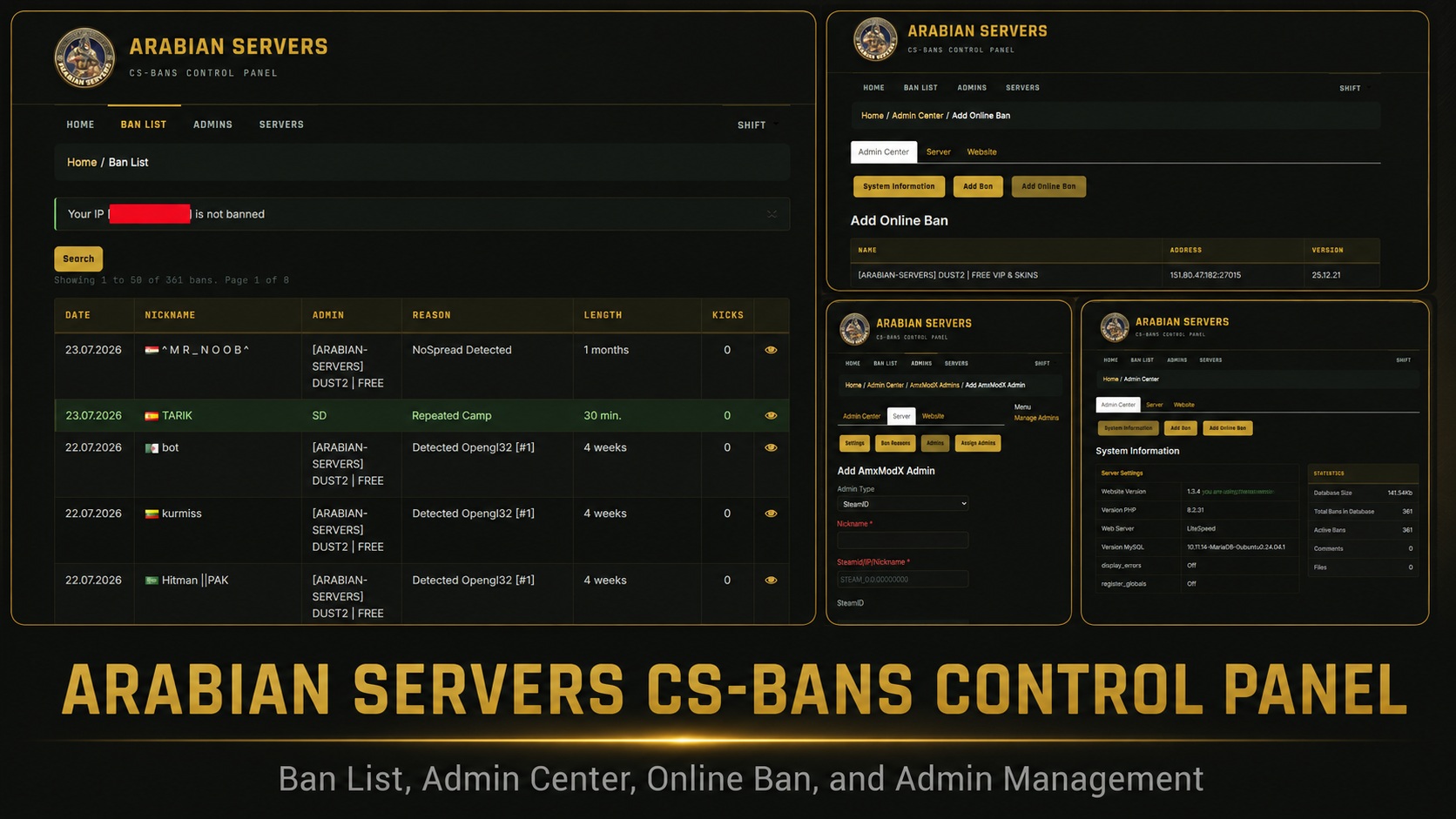
Arabian Servers is pleased to announce the release of Arabian CSbans v1, a maintained and fully translated edition of the classic CS:Bans web panel for Counter-Strike 1.6 servers.
The original CS:Bans 1.3.5 was released by the Craft-Soft Team in 2013. Although it remained useful for AMX Mod X communities, many parts of the system stopped working on modern PHP and MySQL hosting.
Arabian CSbans v1 updates the system for modern hosting while maintaining compatibility with AMXBans database tables and existing Counter-Strike 1.6 server workflows.
What is Arabian CSbans?
Arabian CSbans is a browser-based ban and administration panel for Counter-Strike 1.6 servers running AMX Mod X.
It allows server owners and administrators to publish and manage bans, configure game and website administrators, display live server information, review administrative activity, and perform selected actions on connected players.
The website and game server use the same AMXBans-compatible database. Bans created inside the game can appear on the website immediately, while bans removed from the website can also take effect on the game server.
Live demo here:
https://arabian-servers.com/bansBan Management
- • Public and searchable ban list with pagination.
- • Detailed ban information including player name, administrator, reason, duration and kick count.
- • Add, edit, delete and unban players from the website.
- • Import and export ban records.
- • Upload demos and screenshots as ban evidence.
- • Display player country flags and IP information.
- • Public comments and captcha-protected unban requests.
- • Automatic removal of expired bans.
- Administrators and Permissions
- • Manage AMX Mod X game administrators.
- • Configure admin flags, access permissions and expiry dates.
- • Assign administrators to individual game servers.
- • Create separate website administrator accounts.
- • Configure permission levels for individual administrative actions.
- • Review administrative actions through the system log.
- • Create reusable ban reasons and reason groups.
- Live Server Features
- • Display server online status.
- • Display current map and player count.
- • Show VAC and operating-system information.
- • View connected players, scores and connection times.
- • Use supported browser-based RCON actions.
- • Kick, ban or send private messages to players.
- • Support GoldSrc and selected Source game protocols.
- • Display ban details through an in-game MOTD page.
- Website Features
- • Browser-based installer.
- • No manual SQL importing required for a normal installation.
- • Editable website navigation menu.
- • Configurable homepage, banner and pagination.
- • Dark Arabian theme.
- • Original classic theme included.
- • Search-engine-friendly URLs.
What Changed Since CS:Bans 1.3.5 (2013)
- PHP Compatibility
- The original release could return blank pages or HTTP 500 and 503 errors on modern PHP versions.
- Arabian CSbans v1 was updated to run on PHP 7.4 through PHP 8.2 and was tested on PHP 8.2.
- Framework Update
- The included Yii framework was upgraded from version 1.1.25 to version 1.1.31.
- Server Status Fix
- The old server-query library used PHP syntax that was removed in PHP 8.
- The library was updated so live player count, map, VAC and server operating-system information work again.
- Captcha Fix
- Removed PHP syntax also affected the captcha library used by comments and unban-request forms.
- Captcha generation and validation now work on supported PHP versions.
- Modern MySQL and MariaDB Support
- The database structure was updated with appropriate default values to improve compatibility with strict-mode MySQL and MariaDB installations.
- System Log Restoration
- Some required system-log view files were missing from the original distribution.
- These files were restored and translated, allowing administrators to browse, filter and clear the system log.
- Ban Details Fix
- Ban detail pages could crash when an IP geolocation service returned no result.
- The pages now load correctly with or without location information.
- Complete English Translation
- The public website, administration panel, installer, forms, buttons and system messages have been translated into English.
- New Arabian Theme
- A new dark Arabian theme has been added, while the original classic theme remains available.
- Installer Improvements
- The original application could attempt to connect to the database before an installation configuration existed.
- The database connection process was changed so fresh uploads can correctly reach the browser installer.
- Updated Player Geolocation
- Arabian CSbans v1 includes live country lookup with caching and an offline database fallback.
- Improved Portability
- Hosting-specific configuration was removed from the included .htaccess file so the package can work on standard hosting environments.
System Requirements
- • PHP 7.4 to PHP 8.2.
- • PDO PHP extension.
- • PDO MySQL PHP extension.
- • GD PHP extension.
- • Mbstring PHP extension.
- • Ctype PHP extension.
- • MySQL 5.5 or newer, or a compatible MariaDB version.
- • Apache or LiteSpeed web server.
- • mod_rewrite enabled.
- • AMX Mod X with an AMXBans-compatible database configuration.
How to Install Arabian CSbans v1
Download Arabian CSbans v1 from the official Arabian Servers website:
Upload the Files
Upload the ZIP package to your hosting account and extract it into a directory such as:
public_html/bans/
The system will then be available at an address similar to:
Check File Permissions
In most hosting environments, folders should use permission 755 and files should use permission 644.
Incorrect permissions may cause a blank page or HTTP 500 error.
Create a Database
Create an empty MySQL or MariaDB database.
Create a database user and give the user all required privileges on the database.
An existing AMXBans database may also be used if you want to retain existing bans and administrators.
Open the Installer
Open the installation directory through your browser.
For example:
The Arabian CSbans installer should open automatically.
Enter the Database Details
Enter the database host, database name, username and password.
The database host is commonly:
localhost
Test the database connection, select the table prefix and create the first website administrator account.
The default table prefix can normally remain:
amx
Add Your Game Servers
After installation, sign in to the administration panel.
Open the Servers section and add each game server using the following format:
IP:port
Adding the server's RCON password enables supported actions such as kicking and banning players from the website.
Add Administrators
Open the Administrators section and add your AMX Mod X game administrators.
Configure their access flags, assigned servers and expiry dates as required.
Connect the Game Server
Configure the AMXBans plugin on the game server to use the same database and table prefix selected during website installation.
The relevant configuration file is commonly named:
amxbans.sql.cfg
After connecting both systems, bans issued inside the game should appear on the website, and website unbans should be reflected on the game server.
Security Notes
The following file stores the website database credentials:
include/db.config.inc.php
Never publish or share this file.
Only directories that require runtime writing should remain writable, including:
assets/
protected/runtime/
If the database is hosted on a different server, allow database access only from the website server's IP address and protect the database port using a firewall.
Troubleshooting
Blank Page or HTTP 500 Error
The file permissions may have changed during upload or extraction.
Restore folder permissions to 755 and file permissions to 644.
Homepage Works but Other Pages Return 404
Confirm that mod_rewrite is enabled.
The web server must also be configured to read the included .htaccess file.
Installer Reports a Missing PHP Extension
Enable the required extension through your hosting control panel and reload the installer.
Servers Always Appear Offline
The web-hosting server must be able to send UDP status queries to the Counter-Strike server port.
The game server must also respond to server-status queries.
Database Is Hosted on Another Server
Allow access to the database port only from the website server's IP address.
Do not expose the database publicly, because it may contain administrator details and RCON passwords.
Credits and License
The original CS:Bans system was created by the Craft-Soft Team and Urikh Alexander and was released in 2013.
Arabian CSbans v1 is a maintained, repaired and translated edition released by Arabian Servers.
The project is distributed under the Creative Commons Attribution-NonCommercial-ShareAlike license used by the original software.
The complete license text is included in the download package and displayed inside the application.
© 2013–2026 Arabian Servers.
Download Arabian CSbans v1
The package is approximately 19.7 MB and includes the browser installer, updated framework, translated interface, Arabian theme, classic theme and required application files.